
Moving a procurement spreadsheet or legacy system means preserving meaning, relationships and open obligations. A successful import is one checkpoint; it does not prove that the new workflow is ready to transact.
Define what moves and what remains an archive
Start with a scope decision: suppliers and items, open requests, active orders, agreement balances, receipts, or historical documents. Give each category a destination and an owner. Historical approvals should remain evidence; importing them should not trigger a new approval or imply that a changed record has been approved.
List the obligations that must continue after cutover. An order may be partially received, invoiced elsewhere or awaiting a supplier amendment. Treat these relationships as migration data, not comments that can be discarded after copying the latest row.
Oracle documents purchasing imports that reject insufficient or invalid data and produce a report for correction. Its import parameters separately control approval action and supplier communication; the documented FBDI route does not support updating purchase orders. Check the actual target route and version before designing retries or cutover actions. Read Oracle's purchasing import guidance.
Use a mapping worksheet with explicit decisions
| Mapping question | Decision to record |
|---|---|
| Record identity | Source system, buying entity, document number and line ID mapped to a stable target ID. |
| Supplier and site | Reviewed source-to-target identity map, including unresolved aliases. |
| Units and currencies | Permitted codes, conversion evidence and values that must remain unknown. |
| State | What “approved”, “open” or “closed” means in each system. |
| Relationships | How order, receipt, invoice, agreement and source evidence remain connected. |
| Attachments and access | Destination, retention, permitted readers and evidence that each link resolves. |
Preserve document numbers as text where leading zeros matter. Two entities may reuse a PO number; the number alone is not a safe migration key. Keep original values and mapping decisions so a corrected supplier alias does not erase how the source represented it.
A fictional batch reconciliation
A buyer migrates 120 active PO lines in one batch. The initial target load accepts 110 and rejects 10: six have unresolved supplier-site mappings and four use an unsupported unit code. The source USD line-value total is $48,000; accepted lines represent $45,000 and rejected lines $3,000.
The arithmetic reconciles the batch count and value, but the rejected lines still need resolution. The buyer checks each mapping with the supplier-data owner and fixes unit codes against source evidence. Reprocessing uses the same source-to-target identity map so previously accepted lines are not inserted again.
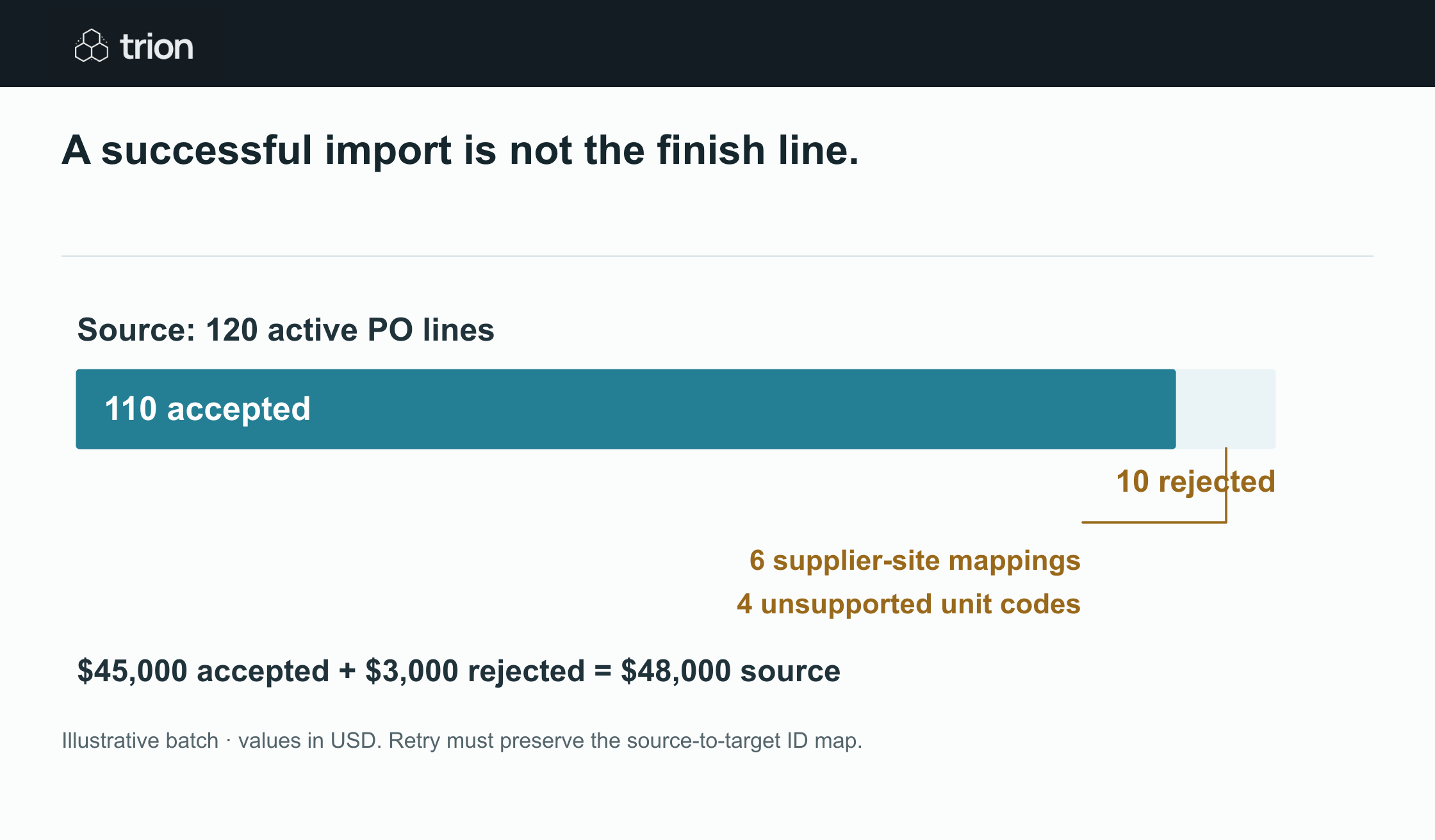

A successful import is not the finish line.
- Source
- 120 active PO lines, $48,000 USD
- Accepted
- 110 lines, $45,000 USD
- Rejected
- 10 lines, $3,000 USD
- Rejection reasons
- 6 supplier-site mappings and 4 unsupported unit codes
View data
| Evidence | Meaning |
|---|---|
| Source | 120 active PO lines, $48,000 USD |
| Accepted | 110 lines, $45,000 USD |
| Rejected | 10 lines, $3,000 USD |
| Rejection reasons | 6 supplier-site mappings and 4 unsupported unit codes |
Illustrative batch · values in USD. Retry must preserve the source-to-target ID map.
Download imageCheck totals by currency and record type. Do not sum USD and EUR into a meaningless grand total. Also check quantities, open balances, dates and relationships; matching a monetary total alone can hide a wrong supplier or swapped line.
Run a rehearsal with side effects disabled
- Take a documented source snapshot and identify the batch.
- Validate mappings and required fields before import.
- Use the target's supported review or staging mode and disable supplier communication during rehearsal.
- Reconcile accepted, rejected and excluded records.
- Open a sample of ordinary and exceptional records with their attachments.
- Test a corrected-record retry and confirm no duplicate target record appears.
Include cancelled lines, partial receipts, revisions, unknown costs and split supplier sites in the rehearsal. Review the actual import parameters: an available “bypass approval” option is not permission to use it. Purchasing and finance owners decide which imported states are valid and who can authorize the cutover.
Plan the change window and recovery
Choose one writer during the switch or define how changes after the snapshot are captured and reconciled. Record the last source change included and the point at which new work enters the target. Keep old-to-new references accessible to staff answering supplier questions.
Specify pause and recovery criteria before the final batch. A serious mapping error should stop new processing. Recovery might restore a staging snapshot or require controlled corrections in the target; deleting posted business records is not a generic rollback method. The system owner must confirm the supported recovery path.
Finish with operational acceptance
Procurement checks active obligations and supplier references; finance checks invoice and balance continuity; operations checks receipt access; IT checks permissions and recoverability. Use the readiness tool and authority worksheet to expose missing owners. The spreadsheet guide helps prepare the source structure. Begin live processing only after the agreed reconciliation and handover checks are accepted.