
An automation’s access should match the operations it is allowed to perform. A workflow preparing a summary needs different permissions from one sending a message or updating a purchasing record. Define those permissions per identity and action before connecting accounts.
Start with an action inventory
List what the workflow reads, proposes, writes, sends, deletes, and administers. Name the target records and allowed fields. “Access to Drive” or “CRM access” is too broad to describe the intended boundary. The configuration must support the scope, and the team needs to understand any broader permissions a connector requires.
Microsoft’s identity-platform guidance defines least privilege as granting users and applications only the data and operations needed for their jobs. Its service-account guidance prefers suitable managed identities or service principals over using ordinary user accounts as service accounts. The identity options depend on the platform and workload. Least privileged access; service-account governance.
Use an explicit access matrix
| Role or identity | Permitted operation | Excluded operation |
|---|---|---|
| Extraction worker | Read designated invoice files; prepare extracted fields | Send messages or alter supplier bank details |
| Finance reviewer | Review evidence and record an authorized decision | Change the workflow’s access configuration |
| Execution worker | Commit a specified approved draft to the permitted target | Choose new terms or execute payments |
| Access administrator | Grant and revoke the agreed technical access | Provide commercial approval by administering credentials |
This matrix is a fictional design, not a claim that every connector supports field-level restrictions or separate worker identities. Confirm the actual permissions and use additional enforceable application checks where needed. If required access is broader than the agreed risk boundary, narrow the integration or revise the scope.
Keep technical access separate from business authority
A credential able to create an order does not establish that a person has approved that order. The execution step needs a valid decision tied to the exact proposal. Verify the approver’s authority, permitted action, target reference, conditions, and proposal version immediately before the commitment.
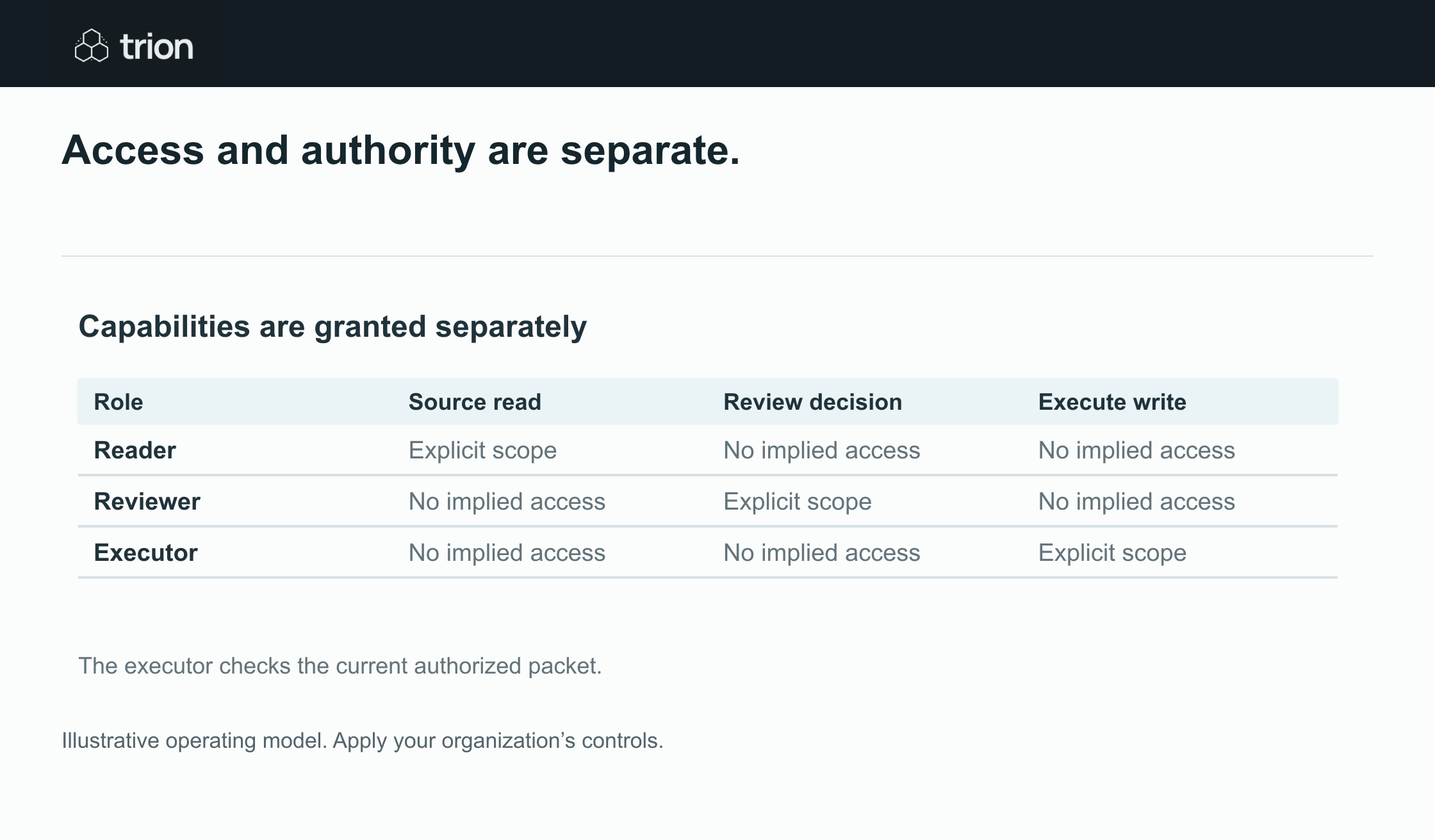

Access and authority are separate.
- Reader
- Read the permitted source. No consequential write
- Reviewer
- Inspect evidence and decide. No implied executor access
- Executor
- Perform the authorized operation. Check the current decision
View data
| Evidence | Meaning |
|---|---|
| Reader | Read the permitted source. No consequential write |
| Reviewer | Inspect evidence and decide. No implied executor access |
| Executor | Perform the authorized operation. Check the current decision |
Illustrative operating model. Apply your organization’s controls.
Download imageDo not rely only on a prompt telling an AI not to act. Keep the send or write tool behind an enforceable gate. Source emails and document text can supply evidence; they should not change the permission policy or act as instructions to expose another client’s records.
Test denied actions deliberately
- Can the reader reach a folder or client record outside the assigned scope?
- Can an unapproved proposal invoke the execution operation?
- Can changing the target after approval reuse the old decision?
- Can a reviewer with no purchasing authority authorize a commitment?
- Does revoked access stop future runs and surface a clear failure?
- Can a support operator inspect logs without receiving unnecessary sensitive content?
Run these tests using the intended identities, not an administrator’s session. Retain the expected denial and actual result. A happy-path connection test proves that access works; it does not prove that the boundary works.
Assign the access lifecycle
Keep an access register with identity, owner, purpose, systems, granted permissions, review date, credential storage location, and revocation procedure. Do not store secret values in the register. Record how ownership transfers when the builder leaves, a staff member changes role, or a workflow is retired.
Decide who handles an expired credential and who may grant new access. Reconnection should restore the approved scope, not expand it merely to get a failed run moving. Test pause and revocation behavior before relying on the workflow for consequential actions.
Make the control review concrete
Use the approval matrix tool to prepare business authority and the readiness tool to identify access gaps. Account permissions, tool gates, review roles, and lifecycle ownership need confirmation in the actual environment. Legal, payment, and commercial decisions remain with the responsible people.