
Document processing should produce information the team can verify and use. Reading text is one step. Identifying the document, assigning fields, preserving evidence, checking relationships, and resolving uncertainty are separate parts of the workflow.
Define the record you need
Start with a schema rather than a request to “read this PDF.” For a delivery document, you might need the supplier reference, document date, order reference, line description, delivered quantity, unit, and source page. Define which fields are required and how missing values should be represented.
Google’s Document AI custom extractor supports extracting entities from particular document types. Its documentation describes entity confidence scores as signals that can support manual review. The exact processor and version matter, so confirm the capabilities available for your intended setup. Custom extractor overview.
Separate the processing stages
| Stage | Output | Review trigger |
|---|---|---|
| Intake | Original file and source reference | Unreadable, incomplete, or unexpected file |
| Classification | Proposed document type | Ambiguous type or mixed document bundle |
| Extraction | Source values and field evidence | Missing or conflicting values |
| Normalization | Typed dates, amounts, and units | Ambiguous date format or unknown unit |
| Validation | Checks against the agreed rules | Mismatch with the expected record |
Preserve the original text alongside normalized values. If a date is printed as 03/04, the workflow should not silently choose a month-first interpretation. If a quantity says two cartons, do not infer an item count without an established pack size.
Use field-level evidence
An illustrative delivery note contains an order reference near the header, quantities in a table, and a handwritten shortage note near the signature. A full-document summary might overlook the shortage. The review record should retain the line values and the note as separate evidence, with their source locations.
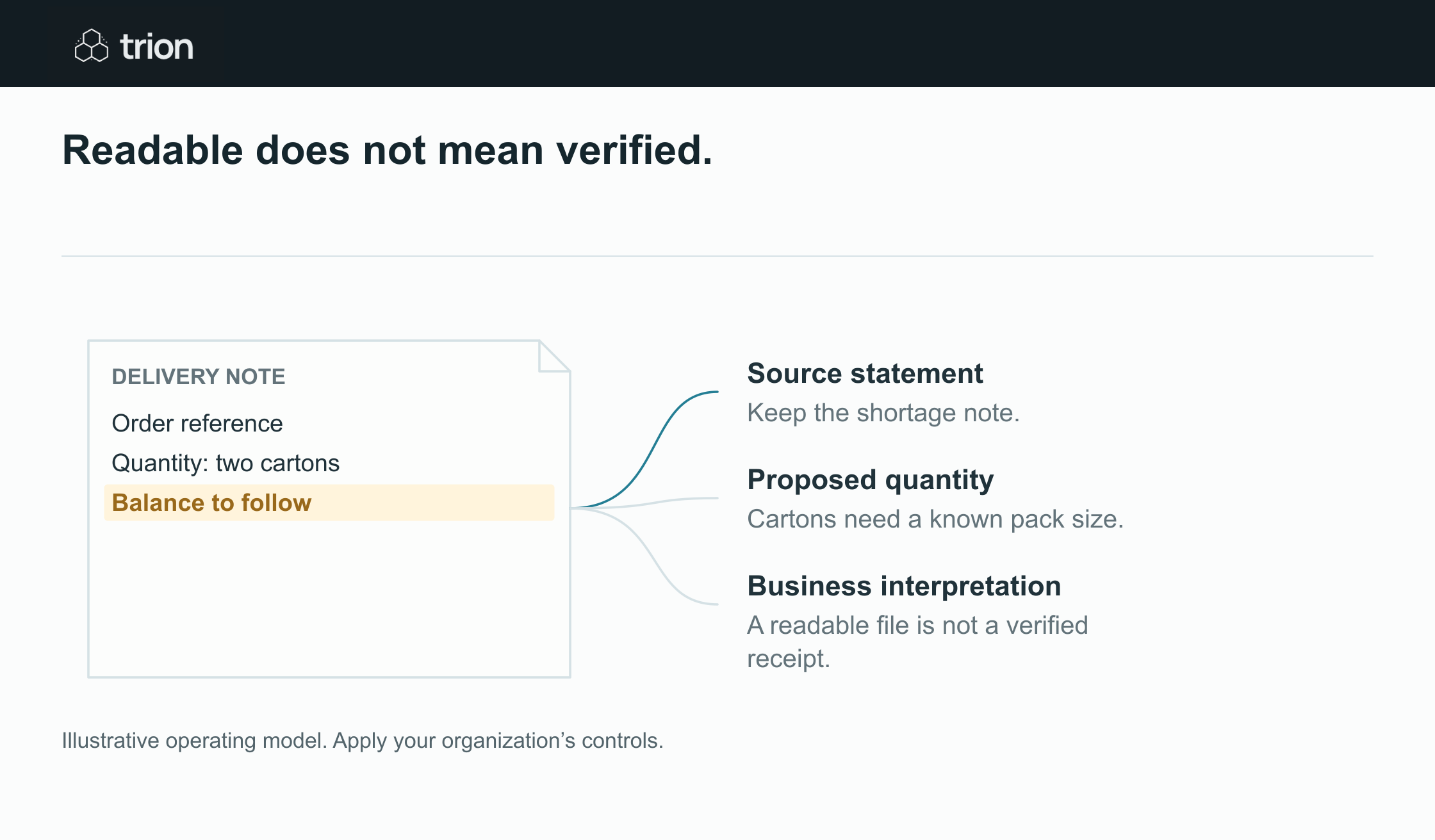

Readable does not mean verified.
- Proposed fields
- Extracted, not yet accepted
- Relationship checks
- Quantity, units and totals
- Review decision
- Correct or confirm with evidence
View data
| Evidence | Meaning |
|---|---|
| Proposed fields | Extracted, not yet accepted |
| Relationship checks | Quantity, units and totals |
| Review decision | Correct or confirm with evidence |
Illustrative operating model. Apply your organization’s controls.
Download imageDo not let a generated summary overwrite the source statement. “Delivery complete” is an interpretation if the actual document says “balance to follow.” Store the wording and send the discrepancy to the person responsible for receiving records.
Validate relationships as well as field formats
A supplier reference can be syntactically valid but belong to a different order. A quantity can be numeric but use the wrong unit. A total can be readable but inconsistent with the line amounts. Add checks against the expected supplier, order, currency, unit, and current document version.
Distinguish an absent value from a value of zero. A blank tax or freight field should not become a zero-charge business assumption. Similarly, a missing signature requires the agreed acceptance review, not an inference that a document is unsigned or authentic based only on image appearance.
Test confidence against your own documents
Google’s evaluation guidance compares extracted entities with labeled test documents and reports metrics including precision and recall. It explains that raising a confidence threshold generally increases precision while lowering recall. That tradeoff needs to be assessed for the fields your workflow uses. Document AI evaluation guidance.
Build a representative labeled sample with clean files, scans, layout changes, missing pages, and unusual line tables. Review critical fields individually. A good average can hide weak extraction of one field that determines the next business action.
A confidence value is not a substitute for a correctness check. Confirm what the specific system’s score represents. Do not convert an unvalidated model score into a probability of business correctness or use it as the sole authorization for a consequential write.
Make correction useful to the next run
Record the extracted value, corrected value, reason, reviewer, and source evidence. Track whether errors cluster around a document layout, field, or supplier. Fix the schema, examples, processor configuration, or intake requirement accordingly. Do not describe every correction as model training unless your implementation actually uses it that way.
Estimate processing and rerun assumptions with the AI processing cost tool. Use the readiness tool to document input and access gaps. A pilot should prove that records are reviewable and exceptions are owned before extracted data is committed to purchasing or client systems.