
A purchase order for 100 items can produce several deliveries and invoices. A single received checkbox cannot describe that purchase. Use line-level quantities and distinct records for receipts, acceptance, invoices, and exceptions so the next reviewer can see what actually happened.
Keep four quantities distinct
At minimum, record ordered quantity, physically received quantity, accepted quantity, and invoiced quantity for each purchase order line. They answer different questions. A dispatch email describes the supplier’s claim about shipment. It does not establish that your team received or accepted the goods.
Give every receipt a date, location, receiver, delivery reference, source evidence, and connection to a specific order line. Record rejected or damaged items explicitly. If a receipt was entered incorrectly, preserve a correction or reversal rather than silently changing history.
Work through a partial delivery
Consider an illustrative order for 100 items at $25 each. The supplier delivers 60 first and says the remaining 40 will follow. The receiving team confirms all 60 are acceptable. The goods value received and accepted so far is $1,500. The total ordered goods value remains $2,500.
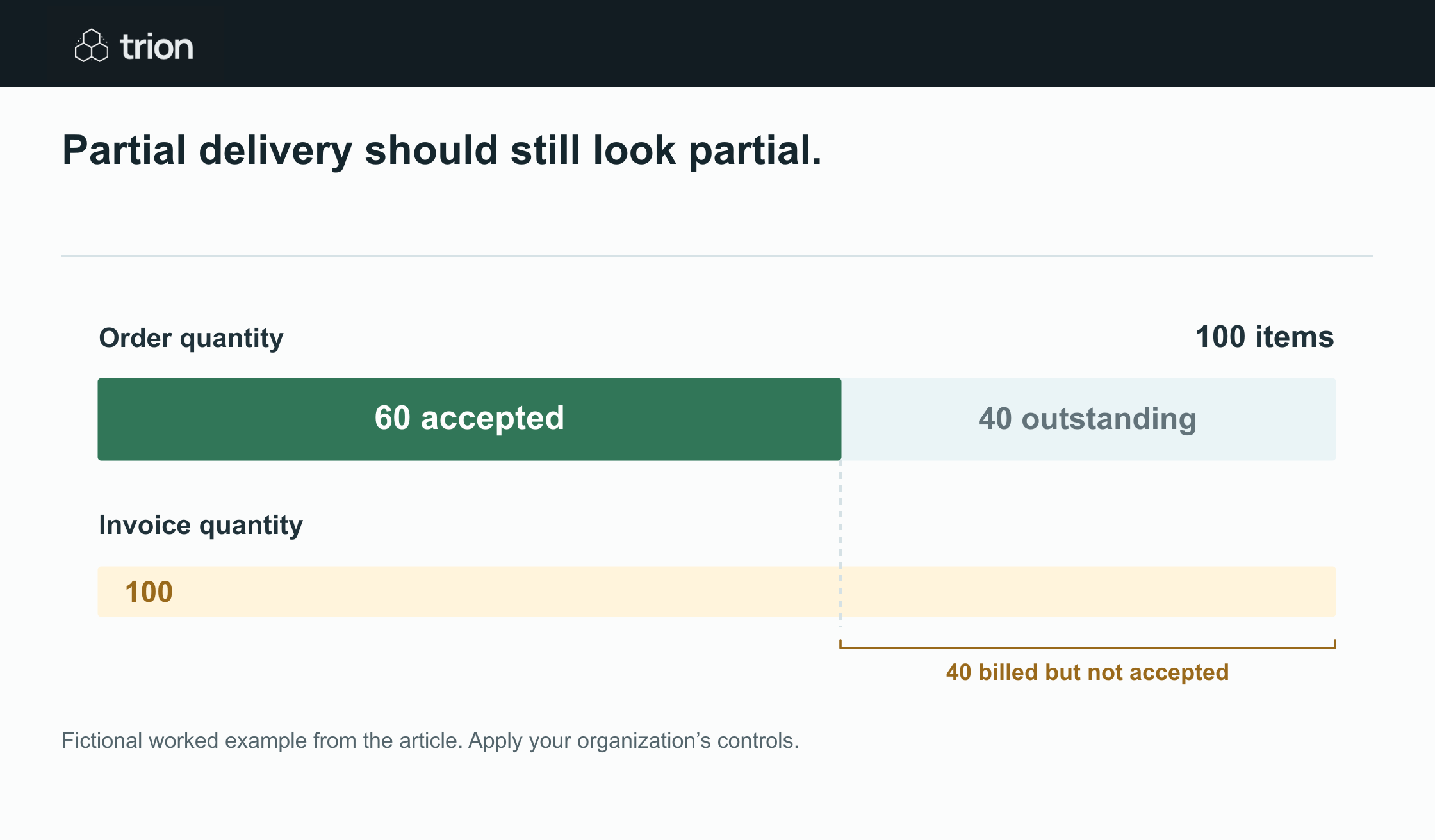

Partial delivery should still look partial.
- Order
- 100 items
- Accepted
- 60 items
- Outstanding
- 40 items
- Invoice
- 100 items
- Difference
- 40 invoiced items have not been accepted; review agreed billing terms
View data
| Evidence | Meaning |
|---|---|
| Order | 100 items |
| Accepted | 60 items |
| Outstanding | 40 items |
| Invoice | 100 items |
| Difference | 40 invoiced items have not been accepted; review agreed billing terms |
Fictional worked example from the article. Apply your organization’s controls.
Download image| Record | Quantity | Operational meaning |
|---|---|---|
| Ordered | 100 | The approved order quantity |
| Received | 60 | The receiving team recorded this delivery |
| Accepted | 60 | The received items met the agreed acceptance check |
| Outstanding | 40 | Still due under the order |
| Invoiced | 100 | The supplier billed the full quantity in this example |
The invoice for 100 needs an exception review because it exceeds the accepted quantity by 40. That does not automatically prove the invoice is wrong. The agreed terms might include advance billing. The workflow should show the difference and route it under your policy, with any permitted advance supported by an explicit approval.
Check the invoice against the purchase evidence
Review each invoice line against the approved order and its current quote version. Check item identity, quantity, unit, price, currency, and any agreed charges. Link the relevant receipts. Do not compare an invoice against an unapproved revised quote just because it is the newest attachment.
Freight, tax, and other charges need their own treatment. If an order has $100 of freight, decide whether it is billed once, split across deliveries, or included in the price. An automation should not repeatedly add the full amount to each partial invoice. Record the policy and flag a charge that exceeds the approved basis.
- Flag a billed quantity above the accepted quantity unless an approved exception applies.
- Flag a price, currency, or unit mismatch against the approved order.
- Flag possible duplicate invoices using supplier identity, invoice reference, date, amount, and document evidence.
- Separate a credit note from a new invoice and connect it to the relevant correction.
Handle damage, returns, and the next delivery
If 5 of the first 60 items are damaged, received quantity is still 60 while accepted quantity is 55. Record whether the 5 will be returned, replaced, or accepted through an exception. Do not add replacements to accepted quantity until they are received and reviewed, and do not erase the original damaged receipt.
When the next 40 arrive, create a second receipt. The order becomes fully received only when the cumulative receipt records reach the ordered quantity, with acceptance and returns assessed separately. A supplier’s “complete” email should not close an order that your records still show as short.
Define the review states and owner
A useful invoice queue distinguishes awaiting receipt, awaiting acceptance, quantity exception, price exception, duplicate review, and ready for finance review. Give every exception an owner, evidence link, and resolution. Avoid a generic blocked status that leaves the team guessing what to do next.
Use the approval checklist to record the evidence and unresolved conditions before progressing an invoice or purchasing action. These controls should follow your agreed policy; they do not authorize a payment. During a pilot, test split deliveries, damaged goods, duplicate attachments, credits, and approved advance billing with your actual records. Human review remains the control for exceptions and final commitments.